
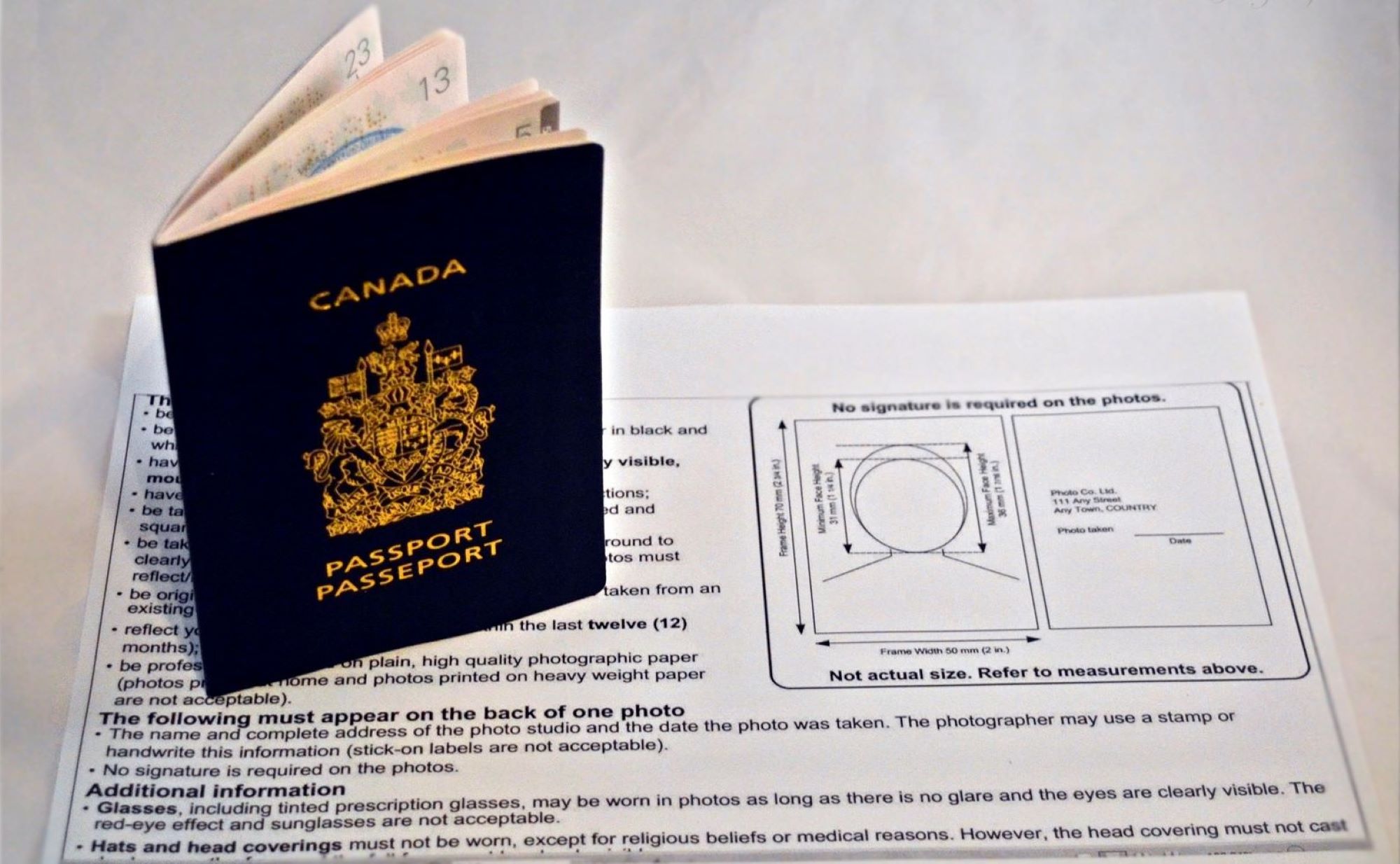
So, you’re planning to get your Canadian passport sorted, but you’re thinking, “Do I really have to go to a photo studio?” Great news—you don’t. With the right setup, a steady hand (or a helpful friend), and some easy-to-follow rules, you can take your Canadian passport photo from the comfort of your living room. Yep, no more standing in lines or paying $20 for a rushed photo. Let’s walk through this step by step, from setting up your space to clicking that perfect shot that meets all the official requirements. Grab your phone (or camera), and let’s do this!
Why Take a Passport Photo at Home?
Taking your passport photo at home is becoming more popular—and for good reason. One of the biggest advantages is the sheer convenience. You don’t have to make an appointment, travel to a photo studio, or stand in line. Instead, you can take your time, find the best lighting in your home, and snap the picture when it suits you best—day or night. Whether you’re a night owl or an early bird, you’re in control of the schedule.
Another major perk is how much money you save. Passport photos at studios or kiosks can be surprisingly pricey, especially if you need multiple copies. When you take the photo yourself, all you need is a smartphone or digital camera and access to a printer or an online service. You avoid the added costs of professional services and unnecessary retakes, which makes this a super budget-friendly option.
Speaking of retakes—this is where doing it yourself really shines. At home, you can take as many shots as you need until you’re happy with the result. No pressure, no rushed photographers, and no worrying about blinking at the wrong time. If your shirt doesn’t look right, if your hair’s off, or if the lighting looks weird, just adjust and try again. It’s all about getting the perfect image without stress.
And let’s not forget the privacy factor. Some people feel awkward getting their picture taken in public or by strangers. When you’re in your own space, you can relax and focus on following the official photo guidelines without feeling self-conscious. You can experiment and refine the image without anyone rushing or judging—just you and your camera, capturing exactly what you need.
Official Canadian Passport Photo Requirements
Before you even think about snapping a photo, you need to be fully aware of the strict guidelines set by the Canadian government. These requirements are non-negotiable—miss just one, and your application could get delayed or rejected. Here’s a comprehensive list of everything your passport photo must meet to be considered valid:
- The photo must be 50 mm wide by 70 mm high. This specific dimension is essential and cannot be altered.
- Your head size, measured from the top of the crown to the bottom of the chin, must fall between 31 mm and 36 mm within the photo.
- The photo must be taken within the last six months to reflect your current appearance.
- The background must be completely plain and either white or light grey—no patterns, textures, or shadows allowed.
- You must have a neutral facial expression. That means no smiling, mouth closed, and no raised eyebrows or exaggerated looks.
- Your eyes must be fully open and clearly visible, with no red-eye, reflections, or shadows obscuring them.
- Head coverings are only permitted for religious or medical reasons, and even then, the full face must remain visible from chin to forehead.
- If you wear glasses, you must remove them for the photo—no tinted lenses, no reflections, and no frames that cover any part of the eyes or face.
- The photo must be clear and in focus, with no blurring, overexposure, or underexposure.
- The lighting must be even, without any shadows on the face or background, and the skin tone should appear natural.
- The image must be a true likeness of you with no digital enhancements, filters, or alterations of any kind.
- The photo must be printed on high-quality photo paper, either glossy or matte, with no creases, stains, or ink marks.
- You must be facing the camera straight-on, with your head and shoulders square to the lens—no tilting or turning in any direction.
- There should be no other objects or people in the frame, and nothing should obstruct your face—not even hair.
- If submitting physical photos, one of the prints may need a guarantor’s signature, depending on the type of application you’re filing.
What You’ll Need Before Starting
| Item | Purpose | Recommended Type | Alternative Option | Important Tip |
| Camera or Smartphone | Capturing a high-resolution photo | Smartphone with 8MP+ camera | Digital camera (DSLR or compact) | Ensure it has autofocus and doesn’t blur—clarity is crucial |
| Tripod or Assistant | Keeps the camera steady at the correct height and angle | Tripod with phone/camera mount | A friend to take the photo | Avoid shaky hands or tilted angles for passport precision |
| Plain Background | Ensures the photo complies with official white/light grey background rules | Smooth white/light grey wall | White sheet or poster board | No patterns, no shadows, and keep it wrinkle-free if using fabric |
| Proper Lighting | Ensures even exposure and natural skin tone without harsh shadows | Natural daylight from a large window | Softbox or ring light | Avoid overhead lighting or backlighting to prevent shadowing |
| Photo Editing Software | Used only to crop and resize the photo according to Canadian specifications | Online photo cropper or Canva | Photoshop, GIMP, or Snapseed | Don’t retouch or apply filters—just crop and size to 50×70 mm and check DPI |
Step-by-Step Guide: Setting Up Your Home Photo Studio
Creating your own home setup for taking a passport photo might sound intimidating at first, but it’s actually quite straightforward. You don’t need a professional studio—just a clean corner in your home, some basic equipment, and a little patience. The first thing to do is find the right background. A plain white or light grey wall is ideal. Avoid anything with patterns, textures, or bright colors that could interfere with the clarity of the image. If you don’t have a bare wall, hang a smooth white sheet or poster board behind you. Just make sure there are no wrinkles or shadows that might compromise the background’s consistency.
Next comes lighting, which can make a massive difference in how your photo turns out. Natural daylight is your best friend here. Position yourself facing a window with indirect light—it will give you even, soft lighting that flatters your face and eliminates harsh shadows. Avoid direct sunlight, which can be too intense and create uneven exposure. Overhead lights are a no-go as well, since they cast shadows under your eyes and nose. You want the light to be front-facing, diffused, and balanced across your whole face.
Once your background and lighting are on point, it’s time to set up the camera. The ideal distance between the camera and the subject is about 1.5 meters. The camera should be positioned exactly at eye level—too high or too low can distort your face and disqualify the photo. Using a tripod is the easiest way to keep your camera stable and correctly positioned. If you don’t have one, place your phone or camera on a table or stack of books, ensuring it’s steady and aligned properly. The frame should capture your head and shoulders with a bit of space above the head and below the chin, as per Canadian guidelines.
By setting everything up correctly before you start, you’re giving yourself the best shot (pun intended) at taking a passport photo that meets every requirement without hassle. It’s all about preparation—once the lighting, background, and camera are correctly set, all that’s left is to strike the right pose and snap away.
How to Pose for a Canadian Passport Photo
Getting your pose right for a Canadian passport photo is just as important as the technical setup. The photo must represent your current appearance and follow strict posture and clothing rules. Here’s a detailed list to help you strike the perfect pose and dress appropriately, ensuring your photo won’t be rejected:
- Stand or sit with your back straight and shoulders relaxed to maintain proper posture.
- Keep your head and face directly facing the camera, with no tilt or turn in any direction.
- Make sure your face is centered in the frame, with equal space on both sides.
- Maintain a neutral facial expression—that means no smiling, frowning, or raising eyebrows.
- Keep your mouth closed at all times, without showing your teeth or opening your lips slightly.
- Your eyes must be open and clearly visible, looking straight at the camera lens.
- Ensure there is no red-eye and no reflections or glare obscuring your eyes.
- Don’t wear white or very light-colored clothing, as it may blend into the white or light grey background.
- Choose solid, dark-colored tops to create a good contrast between your face and clothing.
- Avoid any uniforms, camouflage prints, or clothing with logos—passport photos must not indicate profession or affiliation.
- If you wear religious head coverings, they are permitted, but your full face must remain visible from chin to forehead and from cheek to cheek.
- Do not wear hats, caps, or any non-religious headwear, as they are not allowed in official photos.
- Remove glasses entirely—even clear lenses can create glare or obscure part of your face.
- Tuck away or tie back any hair that covers your face, eyes, or eyebrows, to keep all features clearly visible.
- Avoid wearing heavy makeup or reflective skin products, which can affect how your features appear on camera.
- Remove headphones, wireless earbuds, or accessories that distract from your face or ears.
Taking the Photo: Do’s and Don’ts
| Action | Do or Don’t | Reason | Effect on Photo | Final Result |
| Use high-resolution mode | Do | Ensures clarity and sharpness | Produces a crisp, detailed image | Meets quality standards for official documents |
| Take multiple shots | Do | Gives you more options to choose the best photo | Helps avoid issues like blinking or bad lighting | Increases your chances of selecting a compliant photo |
| Maintain even lighting | Do | Eliminates harsh shadows and keeps features clearly visible | Makes your face evenly exposed without contrast | Photo looks natural and well-balanced |
| Keep the photo in focus | Do | A blurry image will be rejected | Your face must be sharp and recognizable | Ensures compliance with biometric standards |
| Use filters or enhancements | Don’t | Altering your appearance is against passport rules | Filtered photos are considered tampered | Leads to rejection of your application |
| Smile or tilt your head | Don’t | Must have a neutral expression with no head tilt | Affects biometric scanning and facial measurements | Disqualifies the photo for passport use |
| Crop before checking size | Don’t | Incorrect cropping leads to wrong head size or image proportions | May cut off parts of the head or shoulders | Results in an invalid photo submission |
| Wear hats or headphones | Don’t | Non-religious headwear or accessories aren’t allowed | Obstructs the face or ears, which must be fully visible | Photo is automatically rejected by passport services |
Editing the Photo: Crop and Resize with Precision
Once you’ve captured a clear and well-lit photo that meets all the posing and lighting requirements, the next crucial step is cropping and resizing it to match official Canadian passport standards. This isn’t the time for creativity—precision is everything. Even a perfectly taken photo can be rejected if it doesn’t fit the size and proportion criteria. That’s why it’s essential to use a reliable tool or editing software that allows you to fine-tune dimensions accurately without compromising image quality.
There are several free online passport photo editors that make this process easier, but you can also use more advanced software like Photoshop, GIMP, or Canva. These tools let you adjust the frame and position of your head so that it falls within the required measurements. Specifically, the final image must be exactly 50 mm wide by 70 mm high, with your head height measuring between 31 mm and 36 mm, and the distance from the top of your head to the top edge of the photo between 3 mm and 5 mm. These measurements are non-negotiable, so use rulers or built-in guidelines in your software to line everything up perfectly.
You also need to ensure your file is in the correct JPEG format with no compression artifacts, maintaining full clarity and sharpness. The image resolution should be at least 300 dpi to meet print quality standards. A lower resolution may appear pixelated or blurry when printed, which is grounds for rejection. The goal is to maintain a clean, focused image that looks professional and meets the biometric clarity needed for identification.
And here’s the big rule: do not edit your appearance. This isn’t a social media profile pic. No filters, no retouching, no smoothing skin, whitening teeth, or brightening eyes. The Canadian passport office expects an honest, unaltered representation of your face. Any visual manipulation beyond cropping and resizing for dimensions can invalidate your photo. Stick to the basics—clean crop, precise size, high resolution—and you’ll be right on track.